How AI Resume Screening Works in 2026: Complete Guide
See how AI screening tools parse and score resumes in 2026, plus step-by-step strategies to avoid auto-rejection and land more interviews this year.
By Yuvraj Bajwa, Founder, Resumae
July 6, 2026 · Updated August 7, 2026 · 7 min read
Resumae articles are written to help job seekers make better application decisions and are reviewed against our editorial policy.
Most resumes never reach a human.
Often, an algorithm rejects the resume before a human reviews it. By 2026, over 75% of companies use AI for initial resume screening.
You cannot ignore that step. You can, however, write for the way these systems process resumes.
AI screeners follow patterns. Once you understand those patterns, you can make your resume easier to process and more likely to reach a recruiter.
This guide explains how recruiters use AI to screen resumes in 2026 and gives you a step-by-step way to prepare your resume.
What Is AI Resume Screening and Why Should You Care?
ATS means applicant tracking systems, the databases where companies store resumes. AI screening is the layer that reads the resume and decides whether it deserves a closer look.
The rise of AI in hiring (stats from 2025–2026)
According to a 2026 HireVue/SHRM survey, 78% of large employers now use AI-powered tools to evaluate candidates before a human sees their resume. Some tools score resumes on a 0-100 scale. Others rank candidates against other applicants automatically.
Your resume is therefore evaluated by a scoring algorithm as well as against the job requirements.
Key differences between ATS and AI screening tools
| ATS | AI Screening | |
|---|---|---|
| What it does | Stores and sorts resumes | Reads, parses, and scores content |
| How it evaluates | Keyword matching (exact) | Semantic analysis + keyword weighting |
| Output | Basic filter (has/doesn’t have) | Ranked list with candidate scores |
| What it ignores | Formatting (most) | Formatting errors, missing sections |
An ATS might check whether you have “Python” listed. An AI screener may also look for related terms like “machine learning,” “TensorFlow,” and “data pipeline,” then penalize keyword stuffing without context.
How AI Algorithms Actually Read Your Resume
Understanding the mechanics behind AI screening helps you prepare a clearer resume.
Resume parsing: what AI sees vs. what humans see
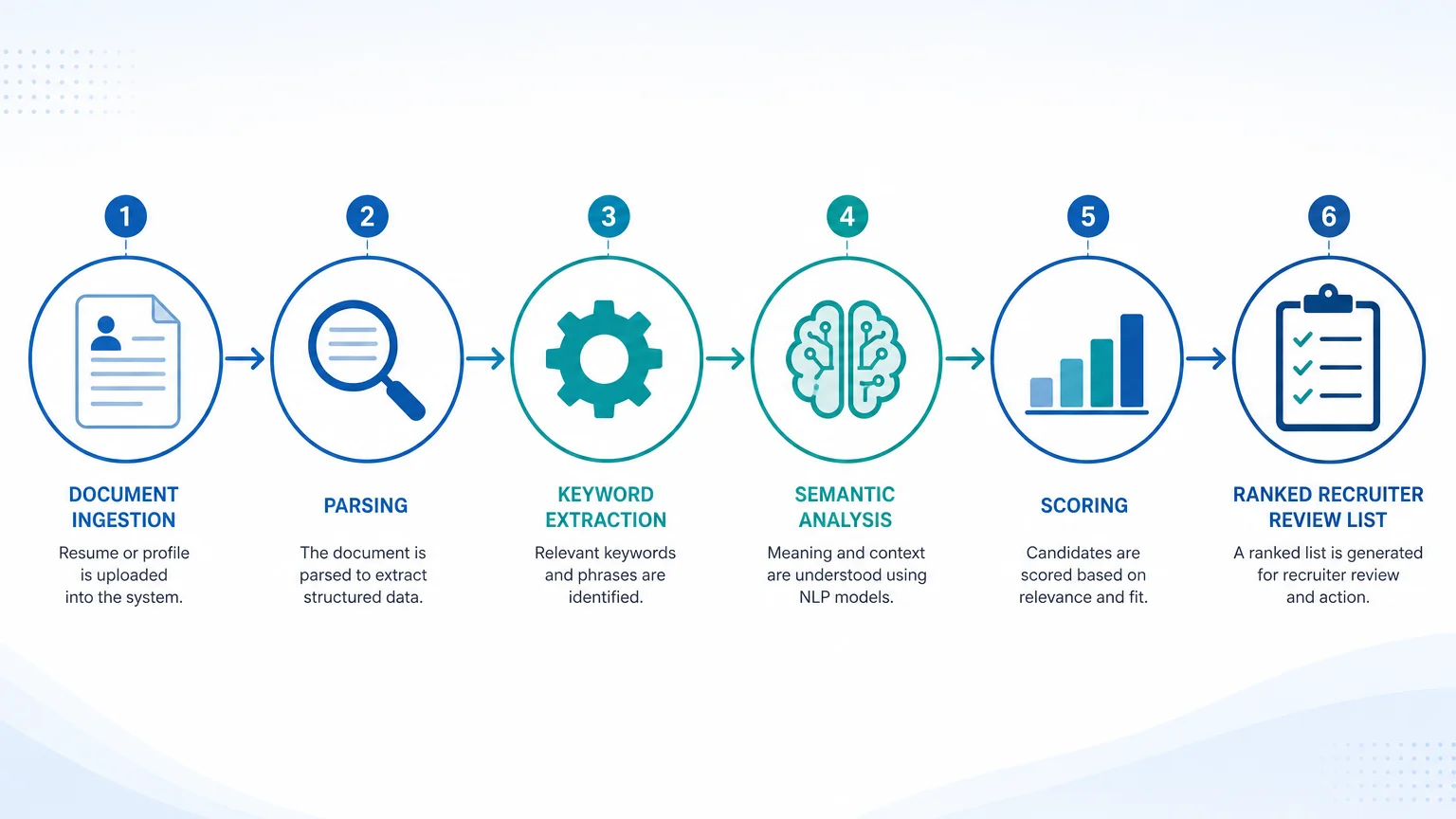
When you submit a resume, the AI parser extracts text from your document. It looks for standard sections: Work Experience, Education, Skills, Certifications. If your section headers are unclear or missing, the parser either ignores the content or misclassifies it.
What AI sees: Structured text in a predictable layout. What breaks the parser: Creative tables, text boxes, images, columns with non-standard header names.
Keyword extraction and semantic matching
Modern AI doesn’t just look for exact keyword matches. It uses natural language processing (NLP) to understand context. For example, if a job description asks for “project management,” your resume should include that exact phrase, along with related terms like “agile,” “stakeholder management,” and “project lifecycle.”
This is where your resume keyword matching strategy matters. You can’t just repeat a word five times. The AI looks for coherent use of terms across your bullet points.
Scoring models: how your resume gets ranked
Most AI screeners assign a numerical score based on:
- Keyword density (how many job-specific terms appear)
- Relevance weight (how closely your experience matches the job level)
- Formatting penalty (if the parser struggled to read your file)
- Semantic gap (missing requirements the AI inferred)
The top 10-20% of scored resumes usually get passed to a recruiter. The rest may be archived without a human review.
Resume Formatting Must-Haves for AI Parsing in 2026
Before you worry about keywords, get the format right. A perfect resume can still fail if the AI can’t read it.
File type tips (.docx vs .pdf)
Use .docx whenever possible. Some AI parsers still struggle with scanned PDFs or PDFs created from image files. If the job post asks for PDF, use a standard saved-from-Word or Google Docs PDF, not a scanned copy.
Section headers that AI recognizes
Stick to these standard headers:
- Work Experience / Professional Experience
- Education
- Skills / Technical Skills
- Certifications / Licenses
Headers that confuse parsers: “What I’ve Done,” “My Journey,” “Career Highlights.” They might work for a human but get ignored by AI.
Font, bullets, tables: what breaks the parser
- Font: Use Arial, Calibri, or Times New Roman. Avoid script or decorative fonts.
- Bullets: Use standard circular or square bullets. Fancy icons or custom characters can disappear.
- Tables: Avoid multi-column tables for your main content. They often break parsing order.
- Images: Don’t embed logos, photos, or graphics. AI can’t read them.
For a deeper dive on formatting, check out our ATS resume formatting tips.
Keyword Strategy That Actually Works Against AI Screeners
Many job seekers either ignore keywords or use them too often. Neither approach works.
How to find the exact keywords recruiters and AI value
Start with the job description. Copy it into a text editor and look for repeated phrases. Pay attention to:
- Required skills (often listed first)
- Preferred qualifications (nice-to-haves with high weight)
- Action verbs used to describe responsibilities (e.g., “managed,” “developed,” “implemented”)
Use a tool like Resumae.xyz’s keyword analyzer to extract the top terms from a job description. Place relevant terms in your experience bullets and Skills section.
Soft skills vs hard skills: what AI weights higher
AI systems place more weight on hard, technical skills because they’re easier to verify. Soft skills like “leadership” and “communication” are considered but only when backed up by context.
Example: “Led a team of 8 engineers” carries more weight than “Strong leadership skills” because the AI can infer leadership from the data.
Using job description language to boost your match score
Don’t just copy-paste. Rephrase your experience to mirror the language of the job description. If they say “managed budgets,” use “managed budgets” instead of “oversaw financial planning.”
This is called resume tailoring. Learn how to do it step-by-step in our how to tailor your resume guide.
Common AI Screening Pitfalls (And How to Avoid Them)
Even good resumes get filtered out for avoidable reasons.
The ‘keyword-stuffing’ trap and how AI now penalizes it
Modern AI can detect unnatural repetition. If you list the same skill 12 times across different jobs, the system may lower your score for “gaming.” Instead, use each occurrence naturally and vary the phrasing.
Creative layouts that confuse parsers
That two-column template with icons? The AI will read left-to-right, top-to-bottom, and may jumble your skills section with your work experience. Stick to single-column layouts with clear hierarchy.
Missing core competencies or certifications
If the job description mentions a certification (PMP, AWS, CFA) and you have it but didn’t list it in a dedicated “Certifications” section, the AI might miss it. Always separate credentials from your education blob.
Tools to Test Your Resume Against AI Screeners Before You Apply
You don’t need to guess. There are tools that simulate AI screening so you can fix problems before hitting submit.
Free vs paid resume scoring tools
- SkillSyncer: Free tier lets you compare your resume to one job description.
- Resumae.xyz: Free AI readiness score that checks formatting, keyword match, and section parsability. See how your resume stacks up instantly.
How to use Resumae.xyz’s AI tailoring feature
Upload your resume, paste the job description, and our AI will suggest bullet point rewrites, missing keywords, and formatting fixes. It’s like having a recruiter edit your resume before you apply.
You can also see how to choose between AI resume tools.
10-Step Checklist to Pass AI Screening
Here’s your quick reference. Run through these before every application:
- Use .docx or standard PDF format
- Section headers are standard (Work Experience, Education, etc.)
- Single-column layout with clear hierarchy
- No tables, images, or text boxes
- Keywords from the job description appear naturally in your bullets
- Hard skills are listed in a dedicated Skills section
- Certifications are separate from Education
- No spelling or grammar errors (AI can flag them)
- Bullet points start with strong action verbs
- Your resume scores 80+ on Resumae.xyz’s AI readiness checker
FAQs About AI Resume Screening in 2026
Is AI screening biased? What you need to know
Yes. Studies (including from Harvard Business Review) show AI can replicate human bias by favoring certain words, educational backgrounds, or phrasing patterns. Use plain, clear language and avoid niche jargon that might flag you as an outsider.
How often do recruiters actually override AI scores?
There is no reliable public figure, and it varies by employer and system. In practice, recruiters can and do look past a ranking: if your resume scores slightly below the threshold but you have a strong referral or cover letter, a recruiter may still pull you up. That’s why a cover letter tailored to the role can help tip the scales.
Will AI ever replace human recruiters completely?
Unlikely. AI handles volume screening, but final hiring decisions still rely on human judgment. Your goal is to reach the human review, where interview skills and personality matter.
Key takeaways:
- Format your resume for AI parsing first. If the parser fails, nothing else matters.
- Use strategic keywords naturally. Match the job description language without stuffing.
- Test your resume before applying. A 30-second check can save weeks of silence.
You can prepare for AI screening by using a readable format and matching the job description naturally.
Upload your resume to Resumae.xyz and get your free AI readiness score. No email required.

About the author
Yuvraj Bajwa
Founder, Resumae
Yuvraj Bajwa is the founder of Resumae, an AI job-search workspace built as part of Coffee Drop Studio. He writes and reviews the resume, cover letter, interview, and application-tracking guidance on this site, drawing on the day-to-day work of building the tailoring, fit analysis, and ATS tools the articles describe.
- Founder
- Product lead
Related reading
AI Resume Writing Guide 2026: Pass ATS and Impress
Learn how to use AI to write a resume that passes ATS screening and impresses recruiters in 2026. Step-by-step guide with expert tips and examples.
Can ChatGPT Write Your Resume? What to Know in 2026
Can ChatGPT write your resume safely in 2026? Learn what AI does well, where it fails, and how to use it strategically without getting flagged by ATS.
How to Negotiate Salary in 2026: Step-by-Step Guide
Master salary negotiation in 2026 with proven scripts, market data tactics, and remote-work strategies. Includes email templates for tech and remote roles.
Next step
Ready to build a resume that gets noticed?
Paste a job description and let AI tailor your resume - free plan, no credit card required.