Resume Keyword Matching: Use Job Keywords Honestly
Find the keywords that matter in a job description, sort them by what you can prove, and place them in your resume without stuffing or copying the posting.
By Yuvraj Bajwa, Founder, Resumae
July 6, 2026 · Updated October 16, 2026 · 4 min read
Resumae articles are written to help job seekers make better application decisions and are reviewed against our editorial policy.

You found a role that fits, polished your resume for an hour, and heard nothing back.
Before a person sees your resume, an applicant tracking system usually compares it with the job description, and recruiters then search those results using the posting’s terms. Both run on keywords. Leave the relevant ones out and the match weakens. Stuff them in and the person who reads it next stops trusting it.
The approach that works for both readers is simple: use the posting’s language wherever it honestly describes your experience.
Why keyword matching matters
The ATS checks how closely your terms line up with the role, and recruiters skim for the same tools, certifications, and skills listed in the posting (Coursera). You do not need to trick anything. You need to describe your real work in the employer’s vocabulary.
Step 1: Read the job description first
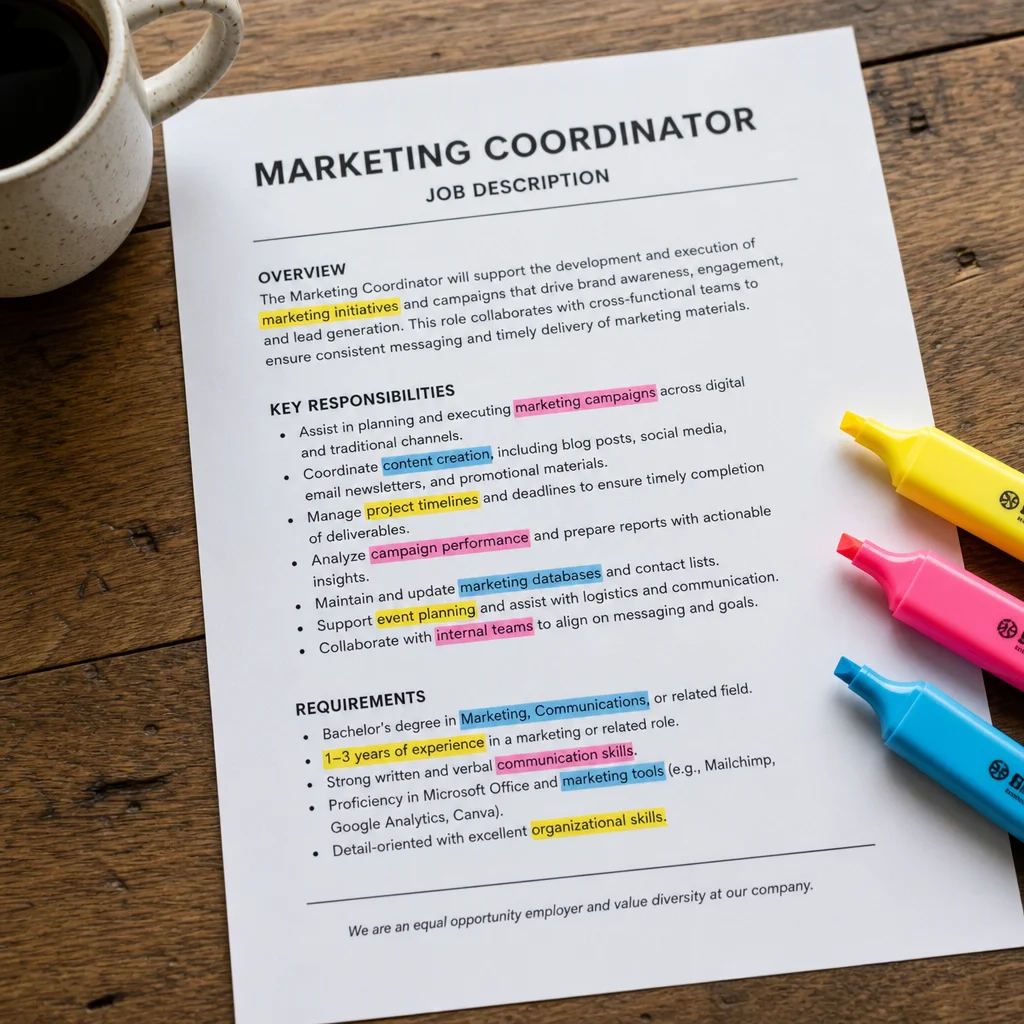
Start with the posting, not your resume. Mark each type of term:
- Hard skills: Python, data analysis, project management
- Tools: Tableau, Jira, HubSpot, Excel
- Certifications: PMP, AWS Certified, Six Sigma Green Belt
- Soft skills: leadership, cross-functional collaboration
- Industry language: Agile methodology, KPI tracking, stakeholder management
Terms that appear more than once, or in the job title, are priorities. So is anything in the Requirements or Qualifications section (Forbes).
Step 2: Sort the keywords by what you can prove
Put every marked term into one of three groups:
- Skills you clearly have, in the same words. Make sure they appear on the resume.
- Skills you have under different wording. This is where tailoring pays off most.
- Skills you do not have. Leave these out.
The second group is the valuable one. If your resume says “built dashboards” and the posting says “executive reporting”, rewrite the bullet truthfully so it connects the two: “Built weekly executive reporting dashboards in Tableau for the leadership team.”
The third group is where people get into trouble. A keyword for a skill you cannot defend may clear the screen and then fall apart in the first interview question. Leave the gap visible.
Within groups one and two, separate must-haves (the Requirements section) from nice-to-haves (Preferred or Desired). Cover the must-haves first. Generic words like “results-driven” or “strategic” add little; use them sparingly.
Step 3: Place keywords in high-signal spots
Do not dump every term into a skills list at the bottom. Spread them through the parts of the resume that explain your work:
- Summary: your top two or three must-haves, in the first lines a recruiter reads.
- Recent experience bullets: one or two relevant terms per bullet, inside a real result.
- Skills section: tools, certifications, and hard skills, using the posting’s spelling.
- Project names or scope notes, where a term describes what the project actually was.
Compare:
- Weak: “Managed projects using Agile methodology.”
- Strong: “Led cross-functional teams using Agile methodology, delivering 3 product launches on schedule.”
The second bullet carries two keywords and still reads as an accomplishment.
Step 4: Include acronyms and full forms
Exact matching is literal. If the posting says “Customer Relationship Management (CRM)”, include both forms at least once (Indeed):
- “Managed Customer Relationship Management (CRM) data for a team of 15 sales reps.”
- “Built lead scoring in Salesforce CRM, improving pipeline accuracy.”
Step 5: Avoid the shortcuts that backfire
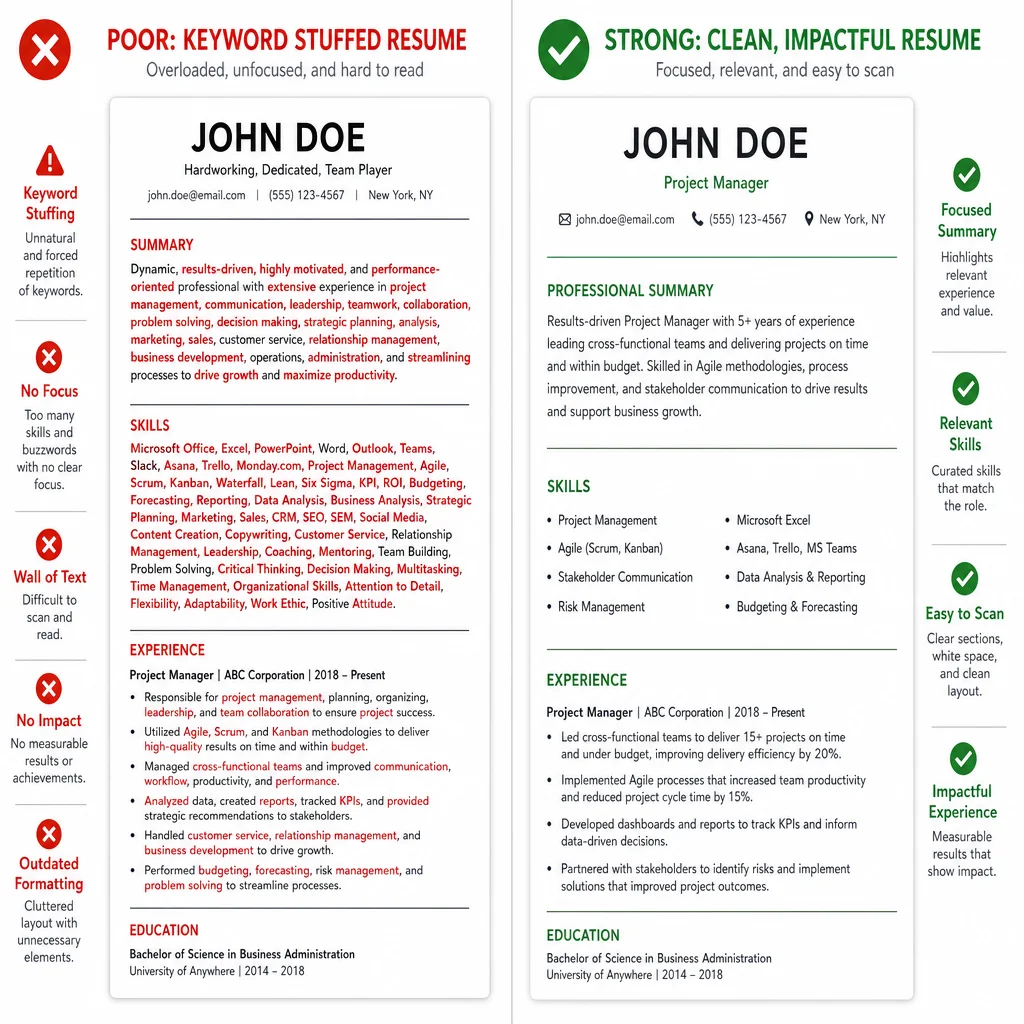
Keyword stuffing. “Managed projects using Agile, Scrum, Kanban, Lean, Six Sigma, and Waterfall” reads as a list, not experience. Pick the two or three you actually used and put them in sentences.
The white-font trick. Hiding keywords in white text is easy to spot when the file is converted to plain text, and a recruiter who notices it will discard the application (Goodwin Recruiting).
Copying the posting verbatim. Pasting “must have strong analytical skills” with no evidence behind it convinces nobody. Use the term, then prove it with an achievement.
Step 6: Check your coverage before applying
Do a quick check before every application. List the must-haves from the posting, then search your resume for each one. Every must-have you genuinely have should appear at least once, in context. Match-rate tools can speed this up; treat their score as a prompt to review gaps, not a target to hit at any cost.
How Resumae helps
Resumae reads the posting, compares it with your resume, and shows keyword coverage alongside fit gaps, so you can see which terms you already have, which need rewording, and which you lack. You approve each suggested change instead of accepting a rewrite without review.
Continue with how to tailor your resume or the AI resume tailoring guide.
Frequently asked questions
How do I find the most important keywords in a job description?
Highlight terms that repeat, appear in the job title, or sit in the Requirements section. Those are the priorities.
Should I use acronyms or full forms?
Both, at least once each, so an exact-match search finds you either way.
Where should keywords go on a resume?
In the summary, recent experience bullets, and skills section, spread across them rather than piled in one place.
Can I copy the job description’s language?
Use its terms where they truthfully describe your work. Do not paste requirements you cannot back up.
Key takeaways
- Start with the posting and mark skills, tools, certifications, and repeated terms.
- Sort by what you can prove, and rewrite the skills you have under different wording.
- Place keywords inside real results in the summary, bullets, and skills section.
- Skip the shortcuts: stuffing, hidden text, and copied requirements all backfire.

About the author
Yuvraj Bajwa
Founder, Resumae
Yuvraj Bajwa is the founder of Resumae, an AI job-search workspace built as part of Coffee Drop Studio. He writes and reviews the resume, cover letter, interview, and application-tracking guidance on this site, drawing on the day-to-day work of building the tailoring, fit analysis, and ATS tools the articles describe.
- Founder
- Product lead
Related reading
Does Tailoring Your Resume Really Matter for ATS?
Learn the truth about ATS resume screening, why tailoring genuinely improves your chances, and how to customize efficiently without rewriting from scratch.
Sent 50 Resumes & Got Zero Callbacks: What Am I Doing Wrong?
Zero callbacks after 50 applications is fixable. See the real reasons your resume is being ignored and fix your next 50 applications.
Resume Fit Score Explained: What It Means and How to Use It
Demystify the resume fit and ATS score in 2026: how it is calculated, why it is not a job-fit verdict, and how to improve without chasing vanity metrics.
Next step
Ready to build a resume that gets noticed?
Paste a job description and let AI tailor your resume - free plan, no credit card required.