Resume Keywords That Work Without Stuffing in 2026
Stop gaming the ATS in 2026. Learn to spot real resume keywords in job posts and weave them naturally to pass screening without looking robotic.
By Yuvraj Bajwa, Founder, Resumae
July 12, 2026 · Updated August 7, 2026 · 5 min read
Resumae articles are written to help job seekers make better application decisions and are reviewed against our editorial policy.

Last updated: August 7, 2026
You found a job that fits your experience and spent an hour polishing your resume.
Then you hear nothing.
Before a person ever sees it, An Applicant Tracking System may filter your resume out. These systems compare what you wrote against the job description, and the comparison runs on keywords.
Stuff keywords in and the resume becomes hard for a person to read. Leave relevant terms out and the match with the posting weakens.
The fix is simpler than it sounds: use the language of the job description where it honestly describes your experience.
Below, we’ll walk through how to spot the terms that matter and weave them in without turning your resume into a word salad.
Why Keyword Matching Matters
An ATS scans your resume and checks it against the job description. The closer your relevant terms line up, the stronger that check may come back.
Human recruiters skim resumes too. They’re hunting for the tools, certifications, and skills listed in the posting.
You don’t need to trick the ATS. You need to match the posting honestly. Put relevant terms where they describe what you actually did.
Source: Coursera - Resume Keywords
Step 1: Read the Job Description Closely
Don’t start with your resume. Start with the job description.
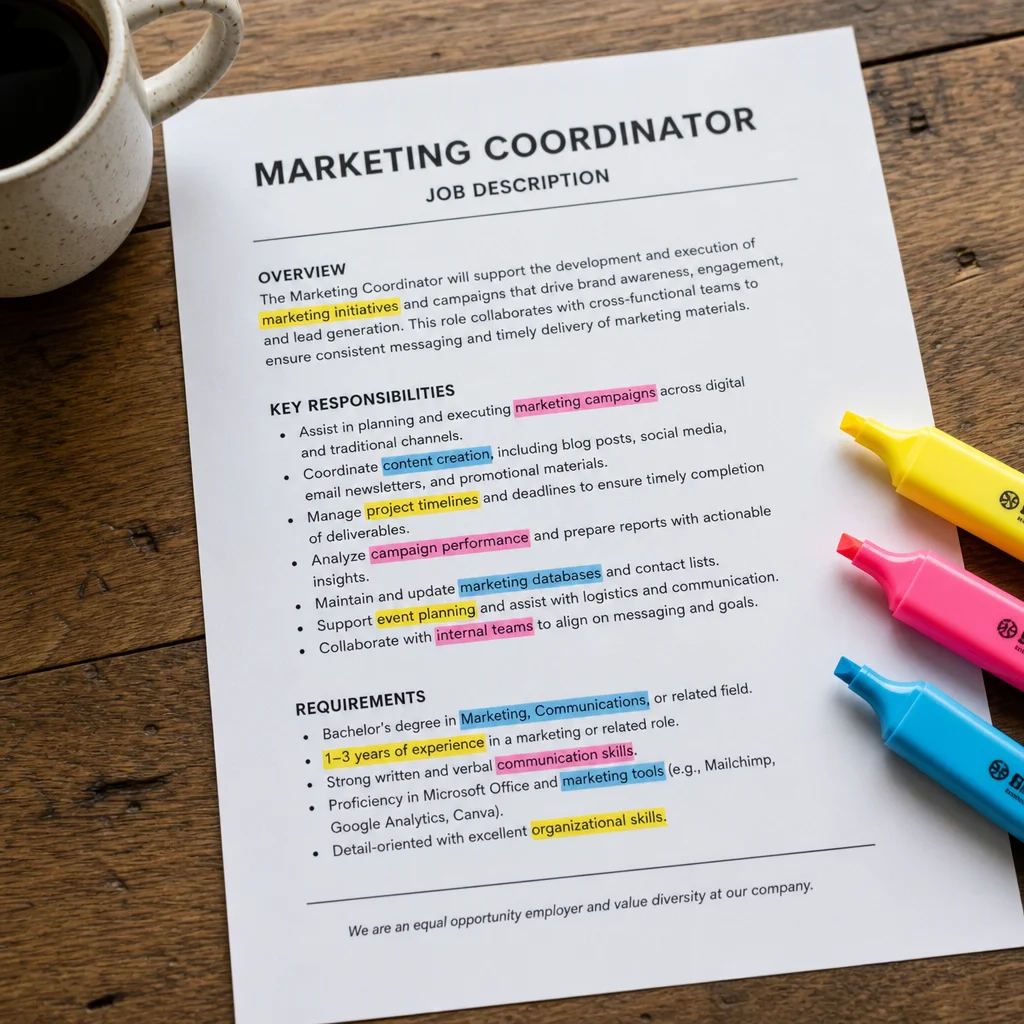
Print it or open a copy, then mark these types of keywords:
Hard skills: Python, project management, Salesforce, data analysis Soft skills: leadership, communication, cross-functional collaboration Certifications: PMP, AWS Certified, Six Sigma Green Belt Tools: Tableau, Jira, HubSpot, Microsoft Excel Industry jargon: Agile methodology, KPI tracking, stakeholder management
Watch for phrases that show up more than once. If the job description mentions “cross-functional collaboration” three times, that’s a signal. Use it.
Also check the “Qualifications” and “Requirements” sections. They often carry the terms that matter most for the role.
Source: Forbes - 30 Powerful Resume Keywords
Step 2: Sort Must-Haves and Nice-to-Haves
Not every keyword has the same weight. Prioritize:
Must-haves: These are the core skills and qualifications listed in the “Requirements” section. If you don’t have these, you need them to get past the ATS.
Nice-to-haves: These appear in the “Preferred” or “Desired” sections. Nice to have, but not critical.
Universal industry terms: Words like “collaboration,” “strategy,” or “results-driven.” Use them sparingly. They’re overused and don’t differentiate you.
If a keyword appears in the job title, treat it as a priority.
Step 3: Place Keywords Naturally
Do not put every keyword in the skills section at the bottom. Spread relevant terms through the parts of the resume that explain your work.
Where keywords should go:
- Professional Summary: The first 2-3 lines. This is prime real estate. Use your top 2-3 must-have keywords here.
- Experience Bullets: Each bullet should weave in 1-2 relevant keywords naturally.
- Skills Section: List tools, certifications, and hard skills here. Group related items logically.
Example:
Bad: “Managed projects using Agile methodology.”
Good: “Led cross-functional teams using Agile methodology, delivering 3 major product launches on schedule.”
The good version uses “cross-functional teams” and “Agile methodology” in a sentence that also describes a result.
Source: LinkedIn - Resume Keyword Optimization Strategies
Step 4: Use Both Acronyms and Full Forms
ATS systems look for exact matches. So if the job description says “Customer Relationship Management (CRM),” your resume should include both “CRM” and “Customer Relationship Management.”
This gives the ATS both forms when it checks for an exact match.
Example:
- “Proficient in Salesforce CRM, including lead management and pipeline tracking.”
- “Managed Customer Relationship Management (CRM) data for a team of 15 sales reps.”
Source: Indeed - ATS Resume Keywords
Step 5: Avoid Common Pitfalls
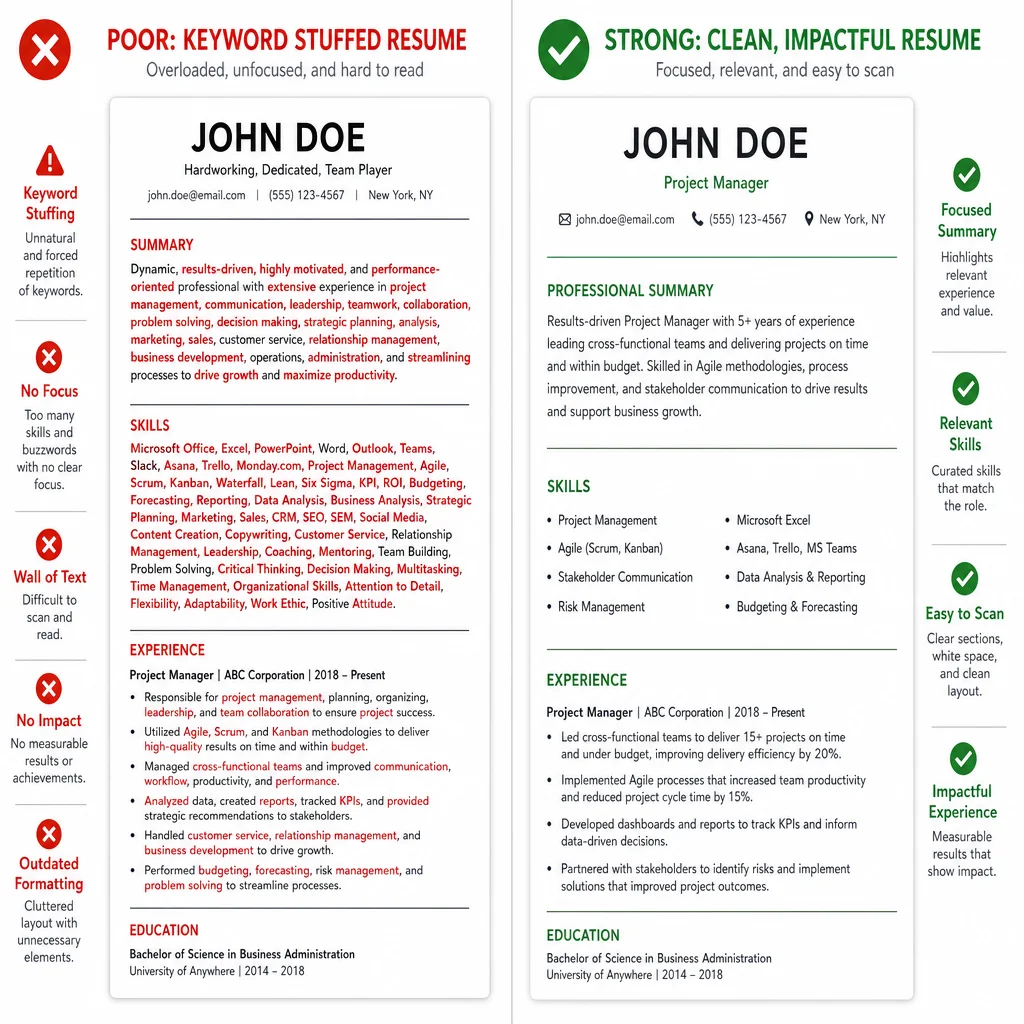
1. Keyword Stuffing
Don’t write: “Managed projects using Agile, Scrum, Kanban, Lean, Six Sigma, and Waterfall methodologies.”
The list is obvious, and recruiters can spot it quickly.
Instead, pick the 2-3 methodologies you actually used and weave them into natural sentences.
2. The White-Font Hack
Don’t hide keywords by making them white text on a white background. ATS systems are smart enough to detect this. And if a human catches it, your application goes in the trash.
Source: Goodwin Recruiting - White Font Hack
3. Copying Job Description Text Verbatim
This is the biggest mistake. If you copy “must have strong analytical skills” and you don’t have evidence of that skill, recruiters will know. AI tools can detect this too.
Instead, paraphrase the concept and back it up with a real achievement.
Source: Resumly - AI Plagiarism Detection
Step 6: Check Your Keyword Match Rate With ATS Tools
You can’t guess if your resume matches. You need data.
Tools to use:
- Jobscan: Paste your resume and the job description. It shows you your match rate and highlights missing keywords.
- Teal’s Keyword Finder: Extract keywords from any job description in seconds.
Use these tools to check your resume before you apply.
Source: Jobscan Source: Teal Keyword Finder
Frequently Asked Questions About Resume Keywords
Q: How do I find the most important keywords in a job description?
A: Deconstruct the job description by highlighting repeated terms from qualifications, skills, and experience sections. These repetitions are high-priority keywords.
Q: Should I use acronyms or full forms for keywords?
A: Use both. Including “CRM” and “Customer Relationship Management” helps you catch exact matches in the ATS.
Q: Where should I place keywords on my resume?
A: Spread them across your professional summary, experience bullets, and skills section. Don’t pile them in one spot.
Q: Can I just copy the job description’s language?
A: No. Stuffing, white-font hacks, and exact copying backfire with humans and bots alike.
Q: How do I know if my resume matches a job?
A: Use tools like Jobscan or Teal’s Keyword Finder to see your match rate before applying.
The point of keyword optimization isn’t gaming the system. It’s mirroring the job description’s language when that language fits your actual background. That clarity helps both the ATS and the recruiter move faster.
Check your match rate free at Teal’s Keyword Finder.

About the author
Yuvraj Bajwa
Founder, Resumae
Yuvraj Bajwa is the founder of Resumae, an AI job-search workspace built as part of Coffee Drop Studio. He writes and reviews the resume, cover letter, interview, and application-tracking guidance on this site, drawing on the day-to-day work of building the tailoring, fit analysis, and ATS tools the articles describe.
- Founder
- Product lead
Related reading
Does Tailoring Your Resume Really Matter for ATS?
Learn the truth about ATS resume screening, why tailoring genuinely improves your chances, and how to customize efficiently without rewriting from scratch.
Sent 50 Resumes & Got Zero Callbacks: What Am I Doing Wrong?
Zero callbacks after 50 applications is fixable. See the real reasons your resume is being ignored and fix your next 50 applications.
How to Tailor Your Resume for ATS: 5-Step Guide
Tailor your resume for ATS and land more interviews. Follow this 5-step guide on keywords, formatting, and match rates for an ATS-proof resume in 2026.
Next step
Ready to build a resume that gets noticed?
Paste a job description and let AI tailor your resume - free plan, no credit card required.